The Workbench is reserved exclusively for engineering students. The room is secured 24/7 and requires card access for entry.
- Utilization Hours: 8:30 AM – 4:30 PM, Monday through Friday.
- Access will be granted upon completion of required safety training and acknowledgment of usage expectations.
- Please respect time limits and reservations for shared resources (e.g., class office hours, workshops, etc.).
Required safety training
Before working in The Workbench (Room 2028 SC), students must complete the following training.
Online ICON safety courses via Environmental Health and Safety (EHS)
- Respirator Voluntary Use (Course # W050OS)
- Machine Guarding (Course # W051OS)
- Tool Safety (Course # W154OS)
- PPE Awareness for Non-Labs (Course # W156OS)
- Fire Extinguisher Safety Training (Course # W160OS)
Register for online safety courses
Hands-on safety orientation
- Students must attend a 20-minute in-person safety orientation that covers how to use tools like the laser cutter, saws, drills, and sanders.
Directions to access the ICON safety courses
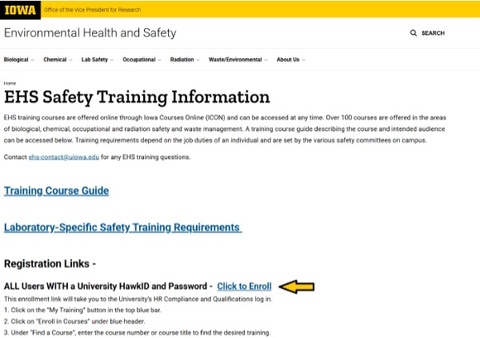
Link to training: https://ehs.research.uiowa.edu/ehs-safety-training-information
Click to Enroll and enter your HawkID and password.
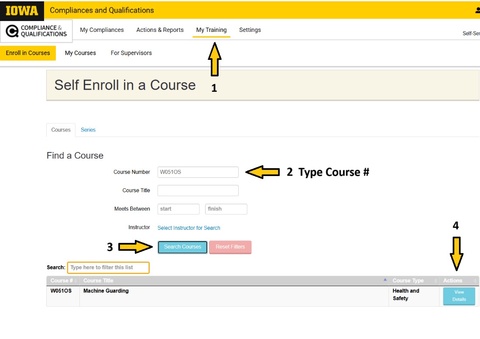
Select My Training. Type the course number. Search courses. View details of the course.
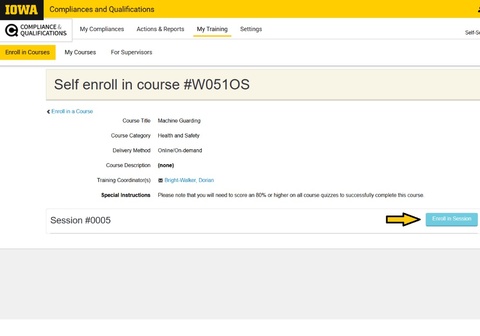
Click Enroll in Session.
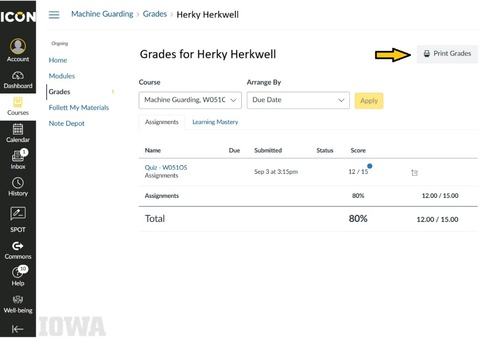
After completing the five safety modules, take screenshots of your grades (must be 80% or higher) and combine all screenshots into a single document. Submit the file via The Workbench Registration Form.
Please note: Students are NOT required to submit the Site-Specific Training Forms.