What is a Degree Audit?
Your degree audit is your official record of academic requirements. It is an academic planning tool that allows you and your advisor to review programs of study (POS) and progress toward completion of university, college, and major, minor, or certificate requirements.
- Declared audits can be used to track progress toward declared majors, minors, and certificates.
- What if? audits can be used to assess how current coursework and credits apply toward completion of non-declared majors, minors, or certificates.
You are required to meet with your assigned advisor at least once a semester to ensure you understand degree requirements, are taking necessary prerequisites, are following correct course sequences, and are making progress to complete all degree and program requirements in the appropriate time.
The Office of the Registrar encodes degree audits using the requirements that appear in the General Catalog, and the audits display the requirements that correspond with the semester the program of study (POS) was declared. For example, a student who declares a major in fall 2025 will be held to the requirements listed for the major in the 2025–2 General Catalog, even if the requirements were changed for fall 2026.
You will use your degree audit in conjunction with the 4-year sample plan to plan your courses for future semesters.
How to Request a Degree Audit
Degree Audits must be requested through MyUI.
- Log in to MyUI.
- Select Advising in the top banner.
- In the Planning & Resources section, click Degree Audit.
- To submit your request, click Request Audit.
- Please note: Make sure the Declared Program of Study radio button is selected and that the program of study (i.e., major, minor, or certificate) that you want to review is selected. If the Declared Program of Study radio button is inactive and you do not have a declared program of study listed in the Degree Audit text box, refer to information on Missing Declared Program of Study.
- After your request has been submitted, a green banner will appear, and you should have a new degree audit within 60–90 seconds.
- Click Check for Completed Audits to review the requested audit.
When to Request a Degree Audit
You should request an audit during each advising meeting or whenever you want to review progress toward degree and program requirements. This ensures that the audit reflects any recent registration or grade changes, as well as the addition of transfer or study abroad coursework.
Reading your Degree Audit
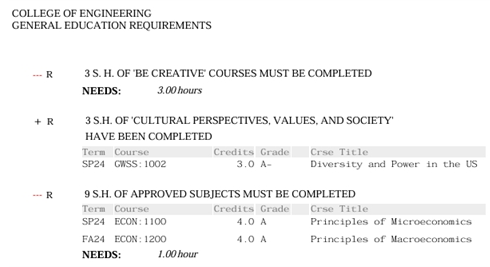
A red minus sign indicates that you have not yet completed a requirement.
A black plus sign indicates a requirement is met. This may be from current (in progress) or previous coursework.
All of your General Education courses are listed together towards the beginning of your degree audit. Note: Only courses and credits that have been officially reported to the University of Iowa will appear on the degree audit.
Classes in the Course Pool, located near the end of the degree audit, are not currently counting toward your engineering degree. Check with your advisor if you have questions about these courses.